How To View Saved Wi-Fi Passwords On Android

Hi today in this post,I am going to tell how to Retrieving Wi-Fi Passwords on Android.Your phone should be rooted.

We will use ES File explorer.
You can download it from play store.

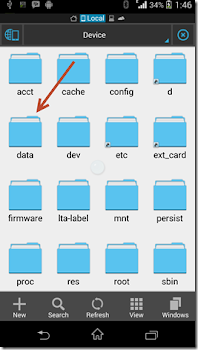
Now move up a folder (to the root
folder) in ES File Explorer and
you will see a directory called
data. Navigate to data/misc/wifi
folder
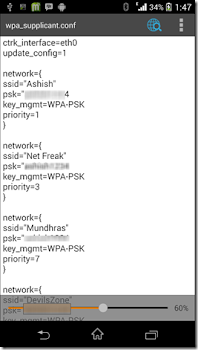
and you will find a file
named wpa_supplicant.conf. Tap
on the file to open it up and make
sure you use ES File Explorer
built-in text/HTML viewer for the
task.


In the file you should be able to
see the network SSID and their
passwords next to it. You can
now search for the SSID
(network name)
and note down
the password next to it and close
the file.

Note-:Please make sure that you don’t
edit the file or you might start
having problems with your Wi-Fi
connectivity.


Keep supporting...
And
Feel free to comment
Thank u ....

How To Root an Android Phone Without Pc (Simple Ways)

There Are Two Ways To Root An Android Phone Without Using Pc

1:- Framaroot

2:- Kingroot


The First Rooting Method Is Using Framaroot :-

Actually Framaroot app is based on exploits (Aragorn and
Gandalf) to install Superuser and SuperSU binary, and
supports a lot of Android smartphones and tablets. Just launch this rooting app and it will find the exploit, using which it can root your Android device. Framaroot Android
rooting app is compatible with Android version 2.0 to Android version 4.0+

You can download Framaroot Android app .APK file from the given direct link below. As we’ve mentioned above
that the interesting thing about this app is that it doesn’t
need any PC/Laptop as Framaroot roots an Android
device just in 5 seconds. If you have rooted your device using Framarat then you can also unroot it easily.

After rooting your Android device, you can
easily remove pre-installed bloat ware apps to free-up lots of storage and increase the device’s performance and battery life.

Download Framaroot :-

 Download Fromaroot 1.93 Apk 


The Second Way To Root an Android is From King Root App :-


KingRoot is a powerful and most reliable free Android
Rooting app made by Chinese developer with the help of
this tool you can root your Android phones or tablets with
just one click button, the developers of kingroot regularly
provide updates that support latest devices. The latest
version of KingRoot is v4.1.0 and you can download
the full APK file here below are the link to download, before downloading the APK-file, first read how to use this application.


HOW TO INSTALL KINGROOT

*First download the apk file

*Go to your File Manager And install apk

*Tick (Unknown Sources ) before installation

*After Installation Open Application

After successful installation, start the application and wait for Kingroot to fully analyze your device. after a few seconds you will see the main window, the Chinese language, but don,t worry we will tell you what to do, See below the main screen of the Kingroot (Click the Big Green Circle on your device that says Root )
and wait for a few minutes make sure you have a good internet connection.


After a few minutes, you should see a tick mark in a
green circle and the blue horizontal bar below the green
circle, which means that your device has been successfully rooted with the help of Kingroot.


These are the instructions to help you in downloading and installing this app on your Android device. Below, you will find the download link which will give you Latest version of Kingroot Full APK file for free.

Download KingRoot :-

 Download Kingroot Apk 

*Caution:- Root your Phone At Your Own Risk it also brick Your Phone (Rarely) We Are Not Responsible For It (Brick Means It Destroy Your Android OS)*

*Keep Visiting*

*More Stuff To Come*

©Thank you..


Internet Download Manager(IDM) Ver.6.23 +Crack+Patch+Serial key

Got irritated while downloading failed.Or slow speed internet.Here 's the solution with latest version of
IDM.


Internet Download Manager (IDM) v6.23 Build 12 + Crack + Patch + Serial key


- One of the most popular and powerful internet downloading software is IDM is released today.


-Its have a great powerful multipart downloading
technology for download quickly any types of file from internet.

- This multipart technology will help you to
increase your download speed up to 5 times than others downloader.

- With this IDM 6.23 Cracked you can also resume your broken download and have also many more features for its popularity.

-You can also able to download live TV or any video in a real time in just one click on the auto download button.

- This IDM 6.23 Full
version also have customize-able function which help you
to download any file as you want.


- Internet Download Manager (IDM) v6.23 Build 12 + Crack + Patch + Registration key

Full version Activator is the latest version of 20 May 2015.

-This new version have been updated some features for its great performance. This version is compatible with
all latest version popular browser even IE 11 and also compatible with Latest Windows 10 and other older
version of Windows. So Download it now from here with IDM v6.23 Build 12 Crack License Activator.


Download from Here:-

 Download 

*Keep visiting and Supporting Us *

*Feel Free To Comment*

Thank You..


Whatsapp Reborn v1.93 Latest version


Hi today in this post
U will get the latest version of WhatsApp Reborn with its amazing features.


WhatsApp Reborn is updating its app
very quickly and within the period of
weeks the new update is available to
users. Today, just few hours ago, the
update of WhatsApp Reborn v1.93 is
available to download and install in
your android smartphones.


Key features of Whatsapp Reborn

¤ COLORFUL : Basically it is a
customizable WhatsApp where you
can change lots of colors, sizes, and
many other things.

¤ EXTRA UPLOAD LIMIT : In addition you
can increase upload media limit
(stock limit is 16Mb) to send large
music files or videos.

¤SEND ORIGINAL PIC : You can
increase quality of pictures sent (by
default resolution is decreased quite a
lot).

¤PARTIAL COPY PASTE : You can select
the part you want to copy from text
rather copying whole text and send it
to people in your contact.

¤ WATCH STATUS : You can directly
watch status in the chat screen from
WhatsApp+! Reborn v1.93.

¤ HIDE PROFILE PICTURE : You can hide
contact profile pictures and show
phonebook pictures (in chat screen).

¤ LOAD OF THEMES : Built-in theme
viewer and downloader. Check
WhatsApp+ users themes online and
apply theme if you like.

How to Install ?
1. First Download WhatsApp plus v1.93 Reborn and save it in your phone.

2. Take the Backup of your chats and
broadcast lists.

3. Delete or Uninstall the WhatsApp
which is already available in your
Device.

4. Open the APK file and install the same
in your Android smartphone.

5. Now follow the screen instruction.
Accept the installation with the
“Accept” button.

6. Congratulation, now you successfully
installed the WhatsApp PLUS Reborn v1.93 in your device.

7. Now Restore the Backup to get all
chats and broadcast list back.

8. Enjoy WhatsApp Plus Reborn.

Updates of New Version: 1.93

- Hide Last Seen MOD
- Blue Tick Hide MOD
- Double Tick Hide MOD
- Hide typing.. MOD
- Change Icon
- ActionBar color changing
Navigationbar color changing (Lollipop
Only)
StatusBar color changing (Lollipop
only)
- Fastest Moded Whatsapp
- AntiBan Code Added
- WhatsApp base 2.12.5 (Play Store)
- FAB Added
- Change chat balloon colors.
- Set a pattern lock on WhatsApp

 Download 

*Note * Always Open Link In New Tab
Sometimes It Open Playstore Bt Don't panic Just Go To previus Tab and Press Download

Hope u like it

Keep Visiting and don't hesitate to comment

Thank you..


How to scare your friends by typing anything in the Notepad

Hi everyone,today in this post
I am telling you to how to scare your friend by using a notepad trick
Whatever u want to display.....


Open Notepad and type the following
code.


* WScript.Sleep 1800
WScript.Sleep 1000
Set WshShell =
WScript.CreateObject
("WScript.Shell")
WshShell.Run "notepad"
WScript.Sleep 100
WshShell.AppActivate "Notepad"
WScript.Sleep 500
WshShell.SendKeys "Hel"
WScript.Sleep 500
WshShell.SendKeys "lo "
WScript.Sleep 500
WshShell.SendKeys ", ho"
WScript.Sleep 500
WshShell.SendKeys "w a"
WScript.Sleep 500
WshShell.SendKeys "re "
WScript.Sleep 500
WshShell.SendKeys "you"
WScript.Sleep 500
WshShell.SendKeys "? "
WScript.Sleep 500
WshShell.SendKeys "I a"
WScript.Sleep 500
WshShell.SendKeys "m g"
WScript.Sleep 500
WshShell.SendKeys "ood"
WScript.Sleep 500
WshShell.SendKeys " th"
WScript.Sleep 500
WshShell.SendKeys "ank"
WScript.Sleep 500
WshShell.SendKeys "s! "


* here you can replace the text with your own text..

*Now save it as
abc.vbs

*And send it to your
friends.

They will shock to see this.........

Keep visiting and
DON'T HESITATE TO COMMENT
Thank u

Facebook Lite :- Now Use Less Data On Fb App

This version of Facebook is efficient
with data and works in all network
conditions.


Facebook Lite :-

- Installs quickly

— the app is less
than 1 MB

- Works on all Android phones

- Uses less data

- Is designed for 2G networks and
areas with slow or unstable
connections


 Download :- Here 


How to Recover Deleted Photos and Suff from Android phone


Wondershare Dr. Fone for
Android is the first ever data
recovery software for Android
Smartphone. Have you ever
deleted message or contacts
on your Android phone or lost
photos or data from SD card
on your android device then
this application is best suited
for you to recover lost data.


Data loss is the common
issue that most of the people
face these days. Whether it's
from PC hard drive or the
Android phone, it is always
the user who suffers. As
Android phones are in trend
these days, the cases of data
loss issues related to this are
really high. People store
music, videos, apps,
documents, photos, mails etc.
on their Android phone and
then found them inaccessible.
So, to get rid of this serious
issue, use Wondershare
Dr.Fone For Android software
that will help you to recover
all your Android stuffs in a
safe and secure place.


Just 3-4 clicks and you are
done. Connect your Android
phone directly using USB
cable to the PC, click on
'Scan' to scan all your lost
data including videos, photos,
audio files and other
documents and then click on
'Recover' to restore all your
data back.

Data Loss Scenarios in
Android Mobile Phones

《 Virus or Spyware attack.
《 Damaged BOOT or FAT
area.
《 Memory card damage or
corruption.
《 Abrupt corruption of
operating system.
《 Accidental formatting or
deletion of SD card.
《 Android phone displaying
"Unsupported File
System" or "Black Media"
on SD card.
《 Improper handling of
Android phone like
switching of mobile phone
abruptly.
《 Removing SD card from
Android device improperly
can also cause file
system to collapse.
《 And so on.


Restore Photos, videos, text
messages, contacts, etc on
Android


If you mistakenly or
intentionally deleted your
important data from Android
phones or tablets or your SD
card gets corrupted on your
Android devices and you want
to recover them, then don�t
feel hopeless, with the use of
Android data recovery you
can easily recover those
deleted or corrupt data such
as photos, videos, audio,
documents, APK application,
contacts, text messages, etc
from any Android phone or
tablet. The software is easy to
use and has simple steps so
that everybody can easily
operate this software. You will
not require any technical
person to handle this
software. You can easily
recover the lost data in just 3
simple steps. Simply scan,
preview and restore the files.


Recover lost data: videos,
mp3, photos, contact, SMS,
etc directly from Android
devices


Once your Android device
connected to your PC, the
software automatically scans
your device.
Restore lost/deleted contacts
with number, names, email id
and address and convert them
into HTML, CSV and vCard to
computer.
Retrieve both received and
sent text messages and
convert them into XML and
HTML file format on your PC
so that you can easily read,
print or import to your device
directly.
Multimedia files such as
photos, audio, videos, etc all
is easily recoverable from the
SD card inserted in your
Android device to a PC.

Preview and recover selected
data


Android data recovery has
unique feature which provides
and make easy for users to
recover their preferred data.
It allows you to preview the
files such as multimedia files,
applications, documents, etc
before final recovery.

Select the files which you
want back and finally recover
and save them on your
computer.

Compatible With all Android
devices (Phones & Tablets)
and all Android OS

The software supports all
Android devices (phones and
tablets) of all brand company
such as Samsung, Micromax,
HTC, Sony, LG, Huawei and
many more.

Compatible for all version of
android operating system All
Samsung devices which have
root facility are compatible,
whether it is Android or not.

Note: If you do not find your
Samsung device on list, then
root your device by yourself
(only root it) and the use
Android data recovery to
restore data..

 It Requires Seriel Key Verification So To Bypass This Use Patch File


 Download Patch+dr.ph. Exe file 

KEEP VISITING AND DON'T HESITATE TO COMMENT